
Using Chat API
The Chat API lets your App Identity take part in Blink Chat: create chats, add people, send messages and respond when someone posts. This guide walks through the typical flow:
- Create a chat with your app and the people you want in it.
- Send messages into that chat.
- Receive messages through webhooks and fetch what was said.
Before you start
You'll need:
- An App Identity, with its Client ID and Client Secret. See Configuring App Identities.
- An access token from the token endpoint, sent as
Authorization: Bearer {access_token}on every request. Tokens last 5 minutes, so request a new one when yours expires. - A webhook URL set on your App Identity, if you want to receive messages.
All Chat API endpoints use the base URL https://api.joinblink.com/api/platform.
Good to know
- Your app only sees chats it's a member of. Always include your app in the chat's members, or it won't be able to post or receive webhooks.
- Only private chats are supported for now. Only the people and apps you add can see a private chat.
- IDs have prefixes so you can tell them apart: users
u-, appsaid-(the same as your Client ID), organisationso-, chatsc-and messagesm-. - Attachments can't be uploaded through the API yet. Messages can include text and markdown.
Creating a chat
To create a chat, send your organisation ID, the chat type (private) and the members, including your app. A title and description are optional, but a title is recommended so people can recognise the chat in their inbox.
curl --location --request POST 'https://api.joinblink.com/api/platform/chats' \
--header 'Content-Type: application/json' \
--header 'Accept: application/json' \
--header 'Authorization: Bearer {access_token}' \
--data-raw '{
  "access_rule": {
    "@type": "private"
  },
  "members": [
        {
            "@type": "app",
            "app_identity_id": "{client-id}"
        },
        {
            "@type": "user",
            "user_id": "USER-ID"
        }
  ],
  "organisation_id": "{organisation-id}",
  "title": "Shift, 10-14 Aug",
  "description": "Conversation linked to our shifts"
}'
A quick look at what's inside the request:
- members: who's in the chat. List your app (so it can post) and the people you want to include. Each
user_idis the ID of a Blink user and starts withu-*. Theapp_identity_idis the same as the Client ID of the App Identity and starts withaid-* - organisation_id: the Blink organisation the chat belongs to. This can be retrieved from the JWT token body generated in the previous step.
- title: the chat name people will see.
- description: an optional note about what the chat is for.
To add more people to an existing chat, send their user IDs.
Sending messages
Once the chat exists, you can post messages to it. Use the chat's ID in the API endpoint, and put the message text in the request.
curl --location --request POST 'https://api.joinblink.com/api/platform/chats/{chat-id}/messages' \
--header 'Content-Type: application/json' \
--header 'Accept: application/json' \
--header 'Authorization: Bearer {access_token}' \
--data-raw '{
  "sender": {
    "@type": "app",
    "app_identity_id": "{client-id}"
  },
  "body": {
    "@type": "markdown",
    "markdown": "**Heads up:** we have limited staff for today"
  },
  "unfurl_links": true
}'
What the fields mean:
- sender: who the message is from (your app).
- body: the message itself. Using
"@type": "markdown"lets you add basic formatting like bold text. - unfurl_links: set to
trueto show a link preview when your message contains a URL.
Adding or removing your app in existing chats
Your app can also be added to chats that already exist in Blink. A chat admin does this from inside the chat, using your App Identity ID (your Client ID, starting aid-).
To add your app, type in the chat's message box: /addapp aid-xxxxxxxx
Once this command is sent, your app will be added to the chat as a member. It can send messages there and receives webhook notifications for activity in the chat, the same as for chats it created.
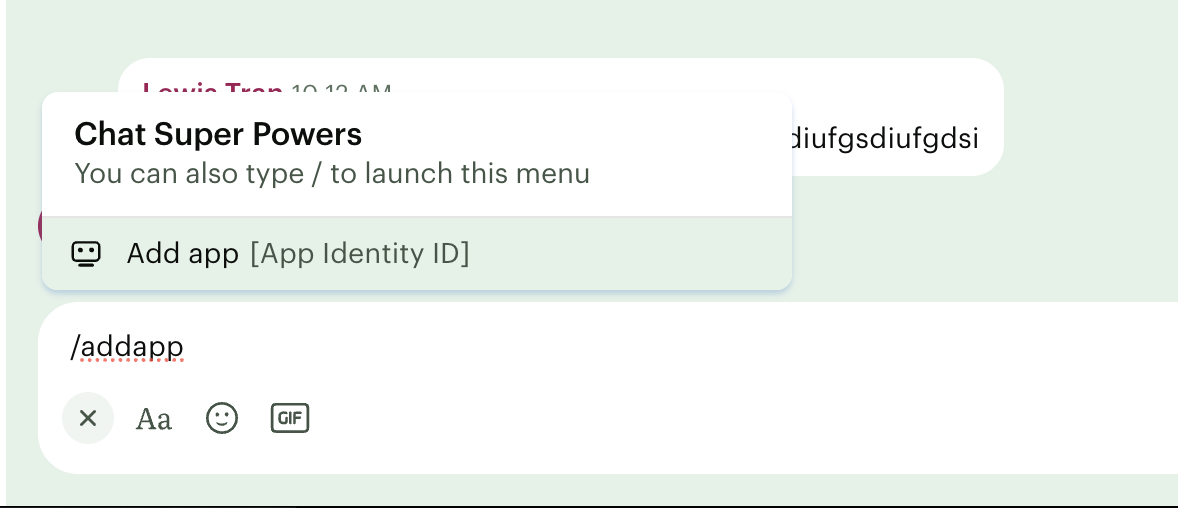
To remove your app, type: /removeapp aid-xxxxxxxx
Note: We're working on an easier way to find and add apps by name.
Receiving messages
When someone posts a message in a chat your app is part of, Blink sends a notification to the Webhook URL you set when creating your App Identity. This is how your integration can react to what people say (for example, to power two-way conversations).
The notification looks like this:
{
    "id": "00000000-0000-0000-0000-000000000000",
    "organisation_id": "o-00000000-0000-0000-0000-000000000000",
    "occurred_at": "2026-09-04T08:43:53.794298Z",
    "detail": {
        "message_id": {
            "chat_id": "c-00000000-0000-0000-0000-000000000000",
            "local_message_id": "m-00000000-0000-0000-0000-000000000000"
        }
    },
    "@type": "blink.chat.message-sent"
}
The notification doesn't include the full message, but instead points to which chat and message it was. Use those IDs to fetch the message details:
curl --location --request GET 'https://api.joinblink.com/api/platform/chats/{chat-id}/messages/{message-id}' \
--header 'Accept: application/json' \
--header 'Authorization: Bearer {access_token}'
Blink returns the message:
{
    "message_id": {
        "chat_id": "c-00000000-0000-0000-0000-000000000000",
        "local_message_id": "m-00000000-0000-0000-0000-000000000000"
    },
    "sender": {
        "@type": "user",
        "user_id": "u-00000000-0000-0000-0000-000000000000"
    },
    "created_at": "2026-09-04T09:01:51.697891Z",
    "files": [],
    "body": {
        "@type": "markdown",
        "markdown": "Hello!"
    },
    "reactions": []
}
Tip: For security, check that each notification really came from Blink before acting on it, by validating the webhook signature. See Webhook usage guide.
Webhook event reference
| Event name | Event type |
|---|---|
| Chat created | blink.chat.chat-created |
| Chat updated | blink.chat.chat-updated |
| Chat deleted | blink.chat.chat-deleted |
| Chat message sent | blink.chat.message-sent |
| Chat message updated | blink.chat.message-updated |
| Chat message deleted | blink.chat.message-deleted |
| Chat message pinned | blink.chat.message-pinned |
| Chat message unpinned | blink.chat.message-unpinned |
| Chat reaction added | blink.chat.reaction-recorded |
| Chat reaction removed | blink.chat.reaction-removed |
| Chat access revoked | blink.chat.access-revoked |
| Chat access granted | blink.chat.access-granted |
| Chat member joined | blink.chat.member-joined |
| Chat member left | blink.chat.member-left |
| Chat member ejected | blink.chat.member-ejected |
| Chat member role changed | blink.chat.member-role-changed |
Updated about 1 hour ago